
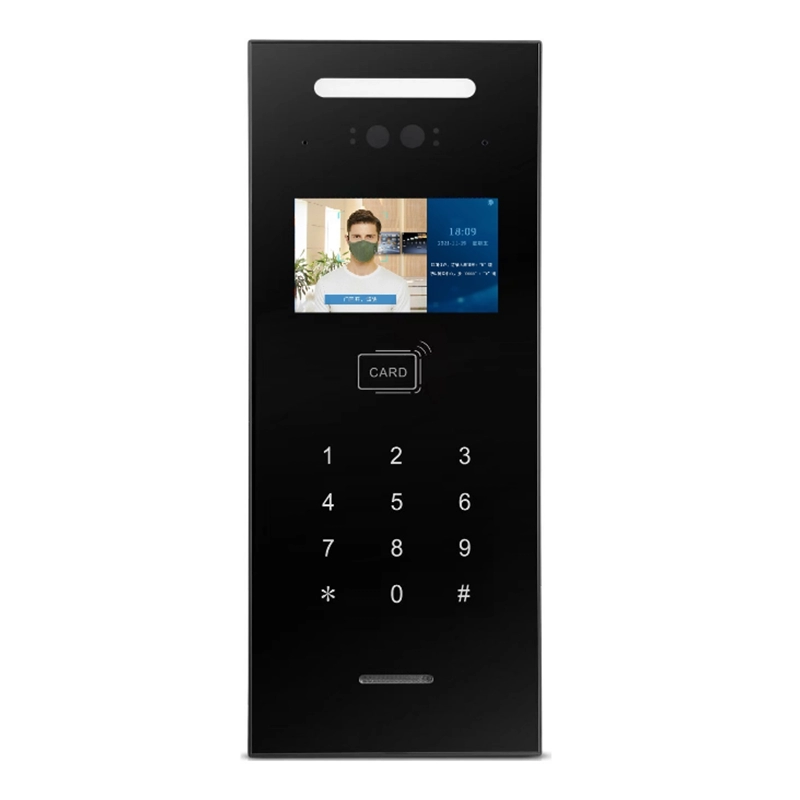
A video intercom system is often described as a door phone, which understates what it actually is. In any multi-unit building, an intercom is a purpose-built network: outdoor stations capture visitor audio and video, indoor monitors answer and release the door, and a central layer manages addressing, security and building services.
Understanding that architecture makes specification far easier, because most project problems — no video, wrong apartment ringing, doors not releasing — trace back to a topology or wiring decision rather than a faulty device.
The Core Components of a Building Intercom System
Door station (outdoor unit)
The door station is the visitor-facing interface. It contains a camera, microphone and speaker, a call button or keypad, and usually an RFID reader. Its job is to capture a usable image in poor light, establish two-way audio, and transmit the call to the correct destination.
Key specifications to look at:
- Camera resolution: 720p is the practical minimum for recognising a face at 1 m; 1080p is now common in mid-range systems
- Field of view: a wide-angle lens (100 degrees or more) shows more of the landing but distorts faces; 70 to 90 degrees is usually a better compromise
- Night vision: infrared LEDs, with automatic switch-over controlled by a photocell
- Ingress protection: IP65 or better for exposed entrances; vandal-resistant housings in public areas
Indoor monitor (indoor unit)
The indoor monitor is where the resident answers. It contains a display, a handset or hands-free speakerphone, unlock and monitor buttons, and sometimes secondary functions such as intercom calling between rooms, image capture or smart-home control.
Display size drives most of the cost difference. A 4.3-inch monitor is adequate for answering a call; a 7-inch or 10-inch monitor is chosen when the unit also serves as a home control panel or when residents are elderly and need a larger image.
Management unit and switch layer
In larger buildings the system needs a management or master station. This provides:
- Call routing and apartment address mapping
- Door release override and event logging
- Connection to the building network or a concierge desk
- Integration with elevators, access control or fire alarm systems
Layer switches and distributors sit between the door station and the apartments, splitting the signal and providing power on two-wire and analogue architectures.
How a Call Actually Flows
The sequence is short, but every step depends on a correct configuration.
- Visitor presses the call button or dials an apartment number on the keypad.
- The door station resolves the address. On IP systems the station looks up the apartment in its local table or on the management server; on two-wire and analogue systems the address is set physically by the switch port.
- The call is routed through the switch layer or the building LAN to the target indoor monitor.
- The monitor rings. If nobody answers within the timeout, the call rolls to the management station or is dropped.
- The resident answers and gets two-way audio plus video.
- The resident presses unlock. A relay command is sent back to the door station, which drives the electric strike or magnetic lock.
Most support tickets we see in the field map to step 2 or step 6 — an incorrect address mapping, or a relay that is not rated for the lock it is switching.
Network Topology Options
There are three broad architectures, and each suits different building types.
IP / network intercom
Every device is an IP node on Ethernet. Wiring is structured — typically Cat5e or Cat6 to each apartment — and the system scales to thousands of units by adding switches. It integrates naturally with access control, CCTV and building management systems, and supports remote management over the internet.
Best for new-build residential towers, campuses, hotels and any project where the developer already has a structured cabling plant.
Two-wire intercom
Power and signal travel together on a two-conductor bus. It reuses existing cabling, needs no network configuration, and is significantly cheaper to install in retrofit projects.
Best for renovation of older residential blocks where pulling new cable is impractical.
Analogue intercom
Branch wiring from a distributor to each apartment, with a fixed address per port. Simple and highly reliable, but limited in capacity and integration capability.
Best for small buildings and budget projects where voice-only or basic video service is enough.
Wiring, Power and Practical Constraints
- Cable type: IP systems need Cat5e or better; two-wire systems need a specified conductor cross-section because the bus also carries power
- Distance limits: every technology has a maximum run. Two-wire buses lose voltage over distance; IP is limited by the 100 m Ethernet segment rule unless fibre or a repeater is used
- Voltage drop: calculate voltage at the furthest device, not at the power supply, or distant monitors will fail intermittently
- Lock power: electric strikes and magnetic locks draw far more current than the intercom relay is rated for; use a dedicated lock power supply and an interposing relay
- Backup power: for access-critical buildings, a UPS on the switch and door station keeps entry working during an outage
Specification Checklist
- Confirm the number of apartments, entrances and secondary doors, not just the unit count
- Decide the technology before the cabling design, not after
- Verify camera resolution and low-light performance with a sample at the actual entrance
- Confirm whether the system must integrate with elevators, CCTV or access control
- Check the door release relay rating against the actual lock current
- Confirm remote management and firmware update capability for ongoing maintenance
- Confirm the warranty and spare-parts policy before committing to a large rollout
Frequently Asked Questions
Can a video intercom work without internet access?
Yes. A building intercom operates on the local network or bus and does not require an internet connection. Internet connectivity is only needed for mobile app calling or remote management.
How many apartments can one system support?
Analogue systems typically handle a few hundred addresses, two-wire systems often up to around a thousand, and IP systems scale into the thousands by adding network switches and management capacity.
Can I mix door stations from one brand with monitors from another?
Generally no. Video encoding, signalling and address protocols are proprietary. Interoperability usually requires a gateway and is best confirmed in writing with the manufacturer before design.
What causes no video on an indoor monitor?
Most often a cabling or addressing fault rather than a hardware failure — a miswired pair, a device on the wrong switch port, or an IP address conflict. Test with a known-good monitor at the same point before replacing hardware.
Conclusion
A building intercom system is an engineered network with three functional layers: capture at the door, answer inside the apartment, and manage centrally. Getting the technology choice and the wiring design right at specification stage costs far less than correcting them after the walls are closed.
Shenzhen Iris Information Technology has developed and manufactured building intercom systems since 2016, covering Linux digital intercom, two-wire intercom, analogue intercom and access control product lines, with HD audio-video processing and biometric recognition capability. If you are specifying a system for a residential, commercial or institutional project, send us your building layout and we will advise on the most suitable architecture.
About the Author
Written by the technical team at Shenzhen Iris Information Technology Co., Ltd., which designs and manufactures building intercom and smart access control systems for projects worldwide.